
Image OCR test: mixed Chinese and English, decimal points and I/l errors
Three public synthetic samples show HotAI OCR output, degradation errors and separate initialization and recognition timings.
What to consider
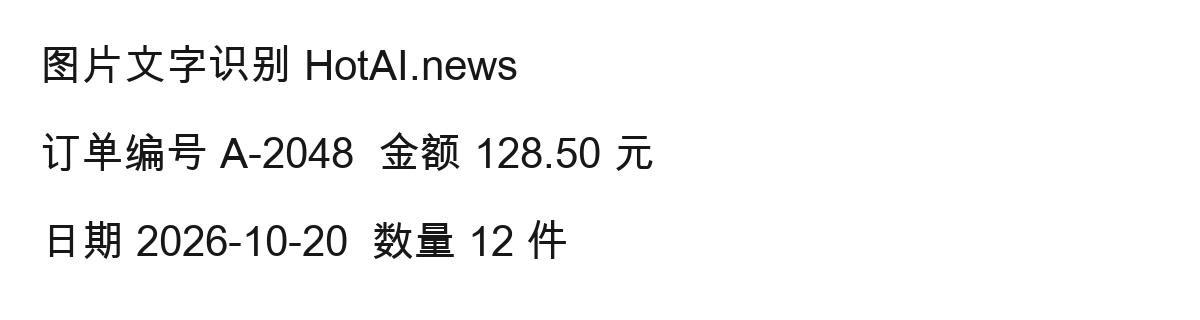
Clear screenshots still need proofreading. We ran three synthetic images through the live HotAI OCR tool in headless WebKit 18.4 on the same macOS ARM64 device: clear English, clear mixed Chinese and English, and a reduced, compressed mixed sample. Amounts and dates survived in both clear images, but the capital I in HotAI became a lowercase l. The degraded image changed 128.50 to 12850 and produced several Chinese errors. Start with the original clear image, choose the matching language, then compare amounts and names against the source before editing.
How the three test images were created and compared
The tests ran on the public OCR page on October 20, 2026, without a login, real invoices or private screenshots. The originals use Arial Unicode text in a dark color on white at 1200 × 320 pixels. We selected English for the English image and Simplified Chinese + English for the mixed image, then used the page’s Start recognition button.
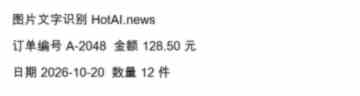
The third image was reduced from the clear mixed sample to 360 × 96 pixels, blurred with a 0.7-pixel Gaussian radius and saved at JPEG quality 28. Its wording stayed the same for direct comparison. These samples reveal specific errors, but do not establish an accuracy rate for phone photos, handwriting or complex tables.
Similar letters can be confused even in clear images
The clear English input read HotAI.news OCR sample; the result read HotAl.news OCR sample. A capital I became a lowercase l. The other two lines preserved order A-2048, amount 128.50 and date 2026-10-20. In this run, the completion message did not remove the need to check the brand name character by character.
The clear mixed sample produced the same I/l error and inserted spaces between several Chinese characters. Its Chinese content and decimal point still corresponded to the original. The raw result below has not been corrected; the spaces are part of the actual output. They can be edited in the result box before use.
图 片 文 字 识 别 HotAl.news
订单 编号 A-2048 金额 128.50 元
日 期 2026-10-20 数量 12 件The degraded image lost the decimal point
After reducing and compressing the same content, the first output line became BJ RFR HolALnews. The second contained TRH A2048 £8 12850 元. The decimal point in 128.50 disappeared, as did the hyphen in the order number. The date 2026-10-20 and the quantity of 12 were still readable, but those surviving details do not validate the rest.
For this kind of result, obtain the original screenshot rather than guessing corrections. When photographing text, keep lines horizontal and avoid shadows over the characters. Crop unrelated background while retaining a small border around the text. Tesseract’s quality guide identifies noise and skew as factors affecting recognition. Merely enlarging a blurred image does not recover missing strokes.
Initialization and recognition were measured separately
The table measures calls made by the actual page. Initialization covers worker creation until its language data is ready; recognition covers the recognize call until text returns. Button-to-completion time also includes the page response. All three tests shared one fresh browser session, so later samples could reuse downloaded data. The third initialization time is not a first-visit benchmark.
| Sample and language | Worker initialization | Recognition call | Button to completion |
|---|---|---|---|
| Clear English / eng | 44.859 s | 0.112 s | 45.028 s |
| Clear mixed / chi_sim+eng | 5.806 s | 0.149 s | 5.997 s |
| Degraded mixed / chi_sim+eng | 0.094 s | 0.120 s | 0.261 s |
How to recognize and proofread your own screenshot
Open HotAI’s Image to text tool and choose a JPG, PNG, WebP or BMP under 10 MB. Match the language to the image. After recognition, check decimal points in amounts and inspect I and l in names. Compare dates and order identifiers against the original before copying the text or using Text cleanup to adjust formatting.
The current implementation processes the selected image in a browser worker and retrieves language data online on first use. Without cached language data, this wait can greatly exceed recognition time. These tests cover desktop WebKit and the three samples above, not a first offline run, phone performance, table structure reconstruction or handwriting. They are not a processing-speed guarantee.
Checked sources
The following sources support the project descriptions and reported facts. The analysis is by the site editors; claims from these sources are not presented as results from our own tests.