
Cleaning copied AI text: tested deduplication, indentation and paragraph behavior
Five synthetic samples show the HotAI text cleaner’s default options, deduplication order and the exact effect on Python indentation.
What to consider
Choose cleanup options for the content type. Five synthetic tests showed that defaults remove line-edge whitespace and blank lines while preserving duplicates. Enabling space normalization and deduplication merged A–double-space–B with A–single-space–B. Defaults also removed indentation from a Python example and are unsuitable for code. With every option off, that example retained its indentation and blank line. This tool formats text; it does not verify or rewrite facts in an AI answer.
Check formatting changes with synthetic text
Testing ran on October 21, 2026, in headless Chrome 155.0.8059.85 on macOS ARM64 using a local preview of the HotAI tool. Samples imitate copied paragraphs and code; no model generated an answer for this test. They check formatting behavior, not model answer quality.
For each sample, checkboxes were set in the page before clicking the cleanup button. The downloaded text was compared character by character with the result field; all five downloads matched. Inputs and options are preserved without manually repairing the results or treating completion as proof of correctness.
Defaults keep duplicate lines but remove blank lines
Defaults trim line edges and remove blank lines; deduplication and repeated-space normalization are off. Two identical Chinese paragraph lines remained in the default result, while their surrounding spaces and separating blank line disappeared. Turn off blank-line removal when those lines separate meaningful paragraphs.
Deduplication runs after enabled whitespace cleanup. With space normalization and deduplication on, A–double-space–B becomes A–single-space–B and then merges with the identical next line. Case remains significant: Agent, agent, Agent becomes Agent followed by agent rather than one spelling.
| Options and sample | Result and limitation |
|---|---|
| Defaults with two identical lines | Duplicates remain; blank paragraph line is removed |
| Space normalization and deduplication on | Only one normalized identical line remains |
| Agent / agent / Agent | Both letter cases remain |
| Python example with defaults | Indentation is removed |
| Python example with all options off | Indentation and blank line remain |
Preserve indentation in code and structured text
The following shows the actual Python sample before and after default cleanup. Its function body originally had four spaces; print and return moved to the line edge. Python uses indentation for statement grouping, so those spaces have syntactic meaning. More compact text does not imply executable code.
Do not apply plain-text defaults blindly to code blocks, YAML or aligned tables. Turning every option off preserved this Python sample exactly. That establishes preservation for the sample, without testing every language or file encoding. Validate the result in the appropriate editor before use.
Before:
def greet():
    print('Hi')

    return True

After default cleanup:
def greet():
print('Hi')
return True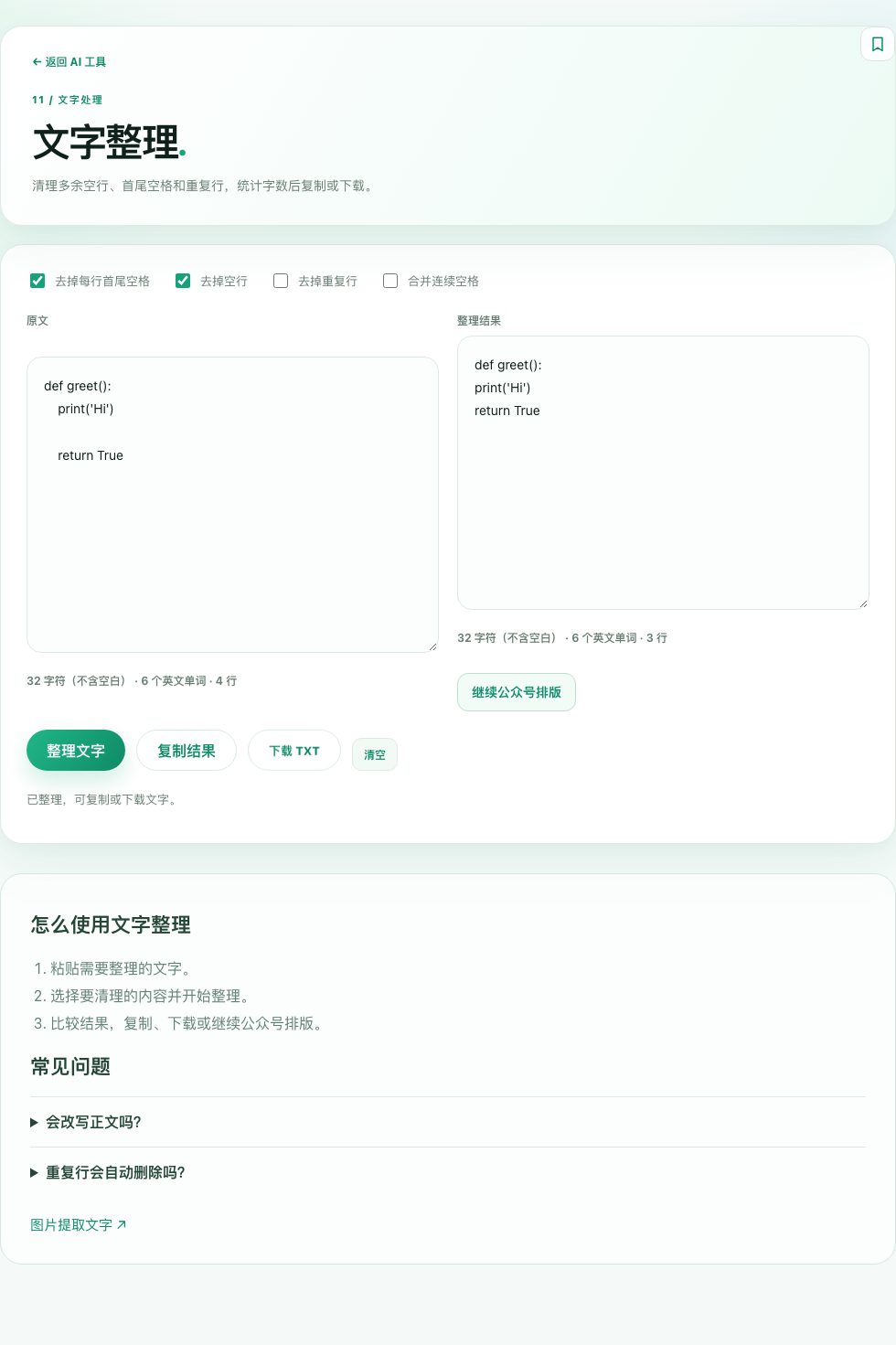
Check the content after formatting
Try a short extract first and compare it with the result. Disable blank-line removal to preserve paragraphs, and enable deduplication only when duplicate records should be removed. The tool does not summarize, translate or fact-check; quotations, amounts and model names still need source verification.
The result file includes each input, checkbox configuration and observed output, with individual text downloads. Long documents, mobile browsers and clipboard permissions were not tested. Matching displayed and downloaded text does not make the defaults appropriate for every input.
Checked sources
The following sources support the project descriptions and reported facts. The analysis is by the site editors; claims from these sources are not presented as results from our own tests.